

Description
Contacts can have different statuses. Here's how to understand them.
Why It's Important
A pending contact is not YET on your list, since they haven't confirmed your invitation to join. Therefore, they cannot be contacted.
Pay attention to delete vs unsubscribe before proceeding, as they can affect your list. When customers no longer want to receive your emails, you can add them to the unsubscribe list, and in the future, if they reconsider and want to re-subscribe, you can reactivate them. However, if you delete them, it's a permanent action and all data will be lost.
What Each Status Means
Active
✅ Contacts can receive your emails and interact with your content
✅ The email is valid, and you have permission to use it.
Pending
❌ Contacts cannot receive your emails and interact with your content
❌ The email is not validated by the recipient, and therefore you do not have permission to use it.
Hard Bounce
❌ The email address is invalid according to the recipient, and therefore you cannot send emails to it.
Soft Bounce
✅ Your last email campaign was not received by the recipient due to a temporary issue, and therefore you can continue trying to send emails to it.
Unsubscribed
Typically done by the contact using an unsubscribe link
❌ The contact is removed from the sending list
✅ All data and list activity will remain stored
✅ The contact will not be added if imported using a list
✅ If the contact subscribes again, all their contact history will be available
Deleted
❌ Contacts are removed from the list
❌ All data and list activity are deleted
❌ If the contact subscribes again, previous history will not be available
This will not affect past campaign reports.
Searching and segmenting by Status and Bounce type
When you filter your contacts, Status and Bounce type are two separate filters. They describe different things, so it helps to understand the difference before you search your list or build a segment.
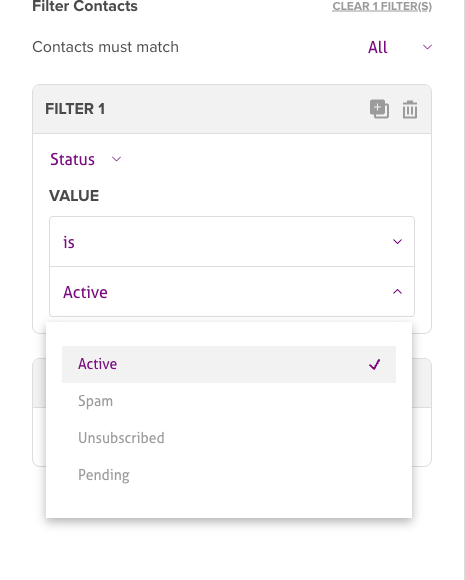
Filter by Status
A contact's Status is their subscription state - whether you're allowed to email them and whether they've confirmed or opted out. In a filter, set the field to Status, choose is (or is not), and pick a value:
- Active - confirmed and able to receive your emails.
- Pending - invited but hasn't confirmed yet (double opt-in), so can't be emailed.
- Unsubscribed - opted out; kept for your records but no longer emailed.
- Spam - marked one of your emails as spam (a complaint).
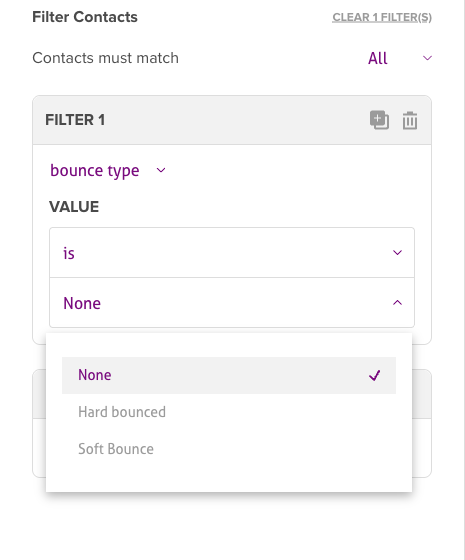
Filter by Bounce type
A contact's Bounce type is a deliverability signal - what happened to your last send to that address. It is not the same as their subscription status. Set the field to Bounce type, choose is, and pick a value:
- None - no bounce; the address is delivering normally.
- Hard bounced - a permanent failure (for example, the address doesn't exist). Stop sending to it.
- Soft Bounce - a temporary failure (for example, a full mailbox). You can keep trying.
Why these two filters are different
Status and Bounce type are independent. A contact can be Active (still subscribed) yet have a Soft Bounce on their last send, or be Unsubscribed with a Bounce type of None. In short: Status tells you about permission and subscription, while Bounce type tells you about deliverability. That's why they are offered as separate filters.
Use them to segment
Any filter you build here can be saved as a segment and reused to target your campaigns. You can combine both filters in one segment, for example:
- Status is Active and Bounce type is None - your most reachable contacts.
- Bounce type is Soft Bounce - addresses to watch or re-engage carefully.
- Status is Unsubscribed - to exclude, or to review for a win-back campaign.
To turn a filter into a reusable group, see Creating dynamic segments.
Best Practices
- Use Unsubscribe when contacts disengage or request removal
- Use Delete only when you need to permanently remove invalid or problematic contacts
- Consider compliance - unsubscribing maintains audit trails
- Preserve data as much as possible for future reactivation campaigns
Compliance Considerations
- Unsubscribing maintains records for compliance with anti-spam laws
- Deleting removes audit trails that may be required for legal compliance
- Always honor unsubscribe requests quickly to maintain good sender reputation
Troubleshooting
Contact stuck in Pending status
- Confirm the contact received and clicked on the confirmation email
- Check that the email address is valid and correctly entered
- Make sure double opt-in is required and properly configured
Hard bounce issues
- Check if the email address is misspelled or no longer valid
- Remove or correct invalid emails to protect deliverability
- Check if the bounce is permanent (hard) vs temporary (soft)
- Consider contacting the user via another channel for an updated email
Unsubscribed contacts accidentally added
- Remember that unsubscribed contacts cannot be re-added via import
- Ask the contact to re-subscribe via your signup form if they want to receive emails again
- Confirm you're not overriding the unsubscribe status in your import file
- Keep unsubscribe history for compliance purposes
Lost data after deleting a contact
- Note that deleted contacts cannot be recovered (all history is lost)
- Use "Unsubscribe" instead of "Delete" if you might need to reactivate them later
- Check that you have backups or exports before permanent deletion
- Be mindful of legal or compliance records before deleting
Related Articles
- Manage contacts - Contact management overview
- Use suppression lists - Unsubscribed status
- Understand complaints, bounces and unsubscribes - Status change triggers
- Create a segment - Segment by status
- Import contacts - Import status management